
Rescale Firewall Administration
Self-service management for Compute Network Application Firewall (CNAF)
This document will guide you through accessing and updating any compute firewalls (CNAFs) in use within your organization.
Introduction
A CNAF is a Rescale hosted firewall service that stands for Compute Network Application Firewall. It is intended for customers who have strict security network restrictions for running Rescale jobs and workstations in one or more compute regions. CNAFs allow network traffic between the Rescale control plane and managed compute regions, so jobs will execute without any issues and can access other Rescale services such as Rescale storage and Rescale licensingLicensing is a legal tool granting users the rights to use, ... More services (Company License Proxies and License Hosting). For customers using Rescale VPN services, internal private routes will still work behind the CNAF firewall service.
By default, any other network traffic outside the compute boundary will be blocked by a CNAF. This includes network traffic between a job clusterA computing cluster consists of a set of loosely or tightly ... More or workstationA workstation is a powerful computer system designed for pro... More and the public internet, and network traffic between a job cluster or workstation and a user’s local on-prem desktop computer. The following diagram depicts how the CNAF firewall service operates within the Rescale environment:
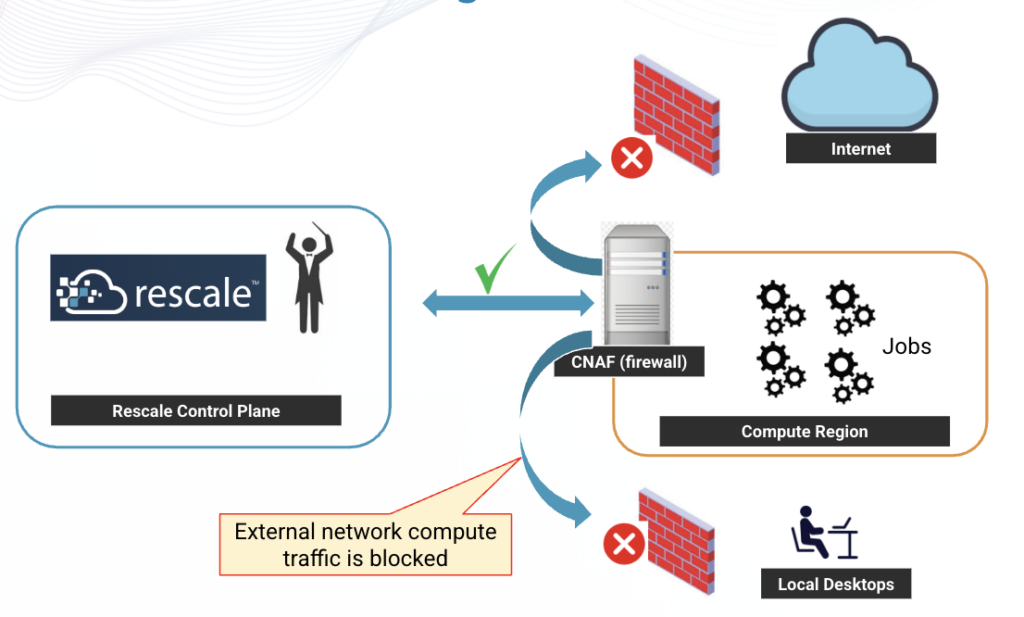
If external network access to the internet is required for certain jobs to run where a CNAF exists in the same compute region, customers can update the allowlist entries for their CNAFs to allow compute network traffic to a specified location that can be an IP address or a domain name. Updates to entries will be applied to all CNAFS that exist for an organization.
Access to the CNAF administration page is limited to organizational administrators only. CNAF updates requested from the administrator page are first reviewed by Rescale staff for security purposes before being applied. The response time for reviewing and approving submitted update requests for CNAFs during normal business hours will usually be within an hour. Acceptable allowlist values include IP CIDR ranges, fully qualified domain names (FQDN), and use of basic regular expressions for domains, such as ‘*’, [a-z], [0-9]*, etc. Direct URL values that begin with https:// are not supported.
Benefits Using Rescale’s CNAF Services
The Rescale hosted firewall solution for compute regions is fully integrated into the existing product platform infrastructure for jobs and workstations. Administration of CNAFs is provided within the existing Administration Portal so having to install and open up a separate application is not required. New jobs and workstations are dynamically configured to operate within the CNAF boundaries without any manual configuration settings required. No advanced expertise in networking or special CSP cloud administrator access is required to administer the Rescale firewall service. Minimum required connectivity to the internal Rescale control plane is ensured for all new submitted jobs and workstations, allowing seamless and transparent execution for HPCThe use of parallel processing for running advanced applicat... More workloads
Ongoing CNAF adjustments and updates can be performed by Rescale administrators, which does not require submitting requests to an external IT organization or network team. Multiple CNAFs are centrally managed within the Rescale administration portal. Change history is provided for firewall updates that can be easily viewed from the CNAF administration page. All CNAF instances are configured for high availabilityThe design and implementation of systems or services that ar... More and are continuously monitored. Rescale provides software updates and 24×7 support for all CNAF services in use.
Provisioning New CNAFs
The CNAF service offered by Rescale is an optional separately priced feature. CNAF pricing is based on the number of units deployed, the complexity of customer environments, and service level offerings. Customers cannot provision new CNAFs through the administration portal, they must be requested and purchased from Rescale beforehand. Once one or more CNAFs are configured and available, customers can view and manage all available CNAFs from the firewall administration page under the Integrations menu.
To best prepare for requesting a new CNAF firewall service, please have the following information available:
- List any known packages or other internet downloads that are expected for use with jobs and workstations, such as Python libraries, Linux utilities, etc.
- Does an existing Company Private Network (CPN) already exist within your Rescale environment? A CPN within the Rescale environment is equivalent to a CSP private network, such as an AWSAmazon Web Services (AWS) is a subsidiary of Amazon.com that... More VPCAmazon Virtual Private Cloud (Amazon VPC) lets you provision... More or Azure VNetThe Microsoft Azure Virtual Network service enables Azure re... More.
- What regional platform is hosting your Rescale organization? (Americas, Europe, Japan, Korea, or ITAR)
- How many different compute regions require CNAF coverage? Please include the CSP provider and CSP region name, such as “
AWS/us-east-1” or “Azure/southcentralus”. - Please provide a list of all allowed IP addresses and domain values for outbound network traffic originating from jobs or workstations.
- Does your company use a NAT (Network Address Translation) gateway ?
- Please list any Rescale licensing services you have in use, such as Company License Proxies (CLPs) and License Hosts (LH).
CNAF Administration
The location of the CNAF administrator page is within the Administration Portal. You must have Organizational Administrator access to view and manage CNAFs. This access is not available for WorkspaceWorkspaces allow rescale customers to create dedicated teams... More Administrators. Naviate to the “Integrations” menu, then select “Firewalls”:
There are four sections on the CNAF administration page:
- Firewall Deployment Details
- This is a list of individual CNAFs that are deployed per CSP region
- IP Allowlist
- This is a list of allowed IP values or CIDR ranges for compute network traffic
- Domain Allowlist
- This is a list of allowed domain values for compute network traffic
- Recent Updates
- This is a list of recent administration changes to CNAF allowlist values
Deployment Details Section
Each individual CNAF that is deployed within an organization will appear in the first section of the administration page:
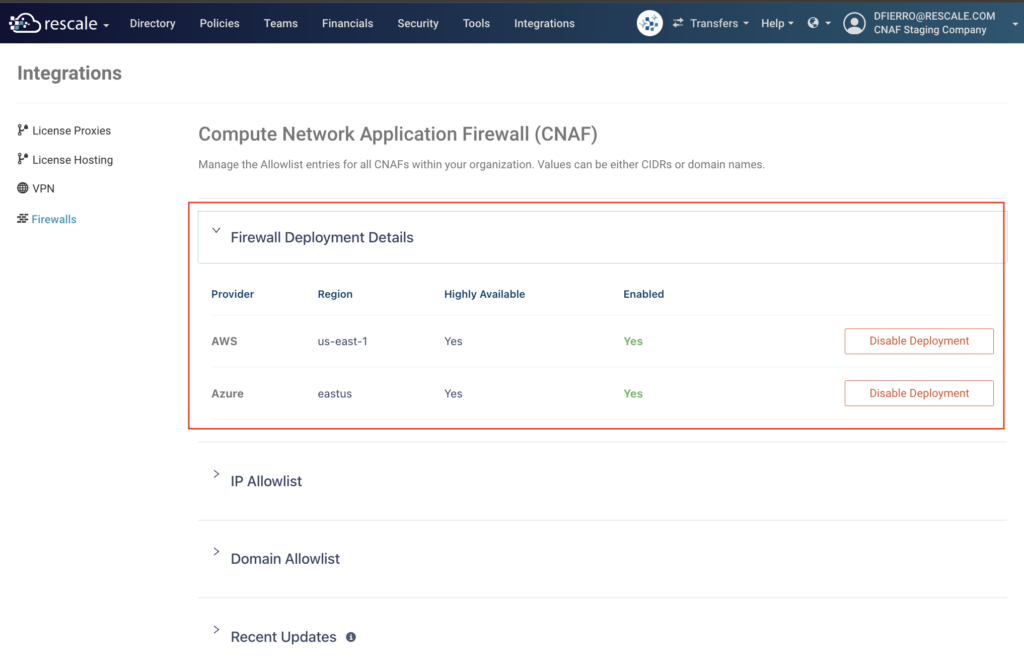
From the list of deployed CNAFs, you can see the total count, which compute regions are covered, and the enablement status. New CNAFs cannot be created from this administration page. Contact Rescale if you wish to provision new CNAFs for use.
A CNAF can be temporarily disabled, meaning that the firewall blocking of any network traffic is suspended. This does not remove or terminate the CNAF. Disabling a CNAF will effectively let all network traffic through in the compute region where it resides. You can cancel a request to suspend a CNAF in the “Recent Updates” section at the bottom of the page.
IP Allowlist Section
The next section on the CNAF administration page is the IP Allowlist table. These values are synchronized across all deployed CNAFs within an organization, so it is not necessary to update each individual CNAF instanceAn Amazon Virtual Machine More. Organization administrators can add or remove entries in the IP Allowlist, and provide a short description for new entries.
To remove an existing value in the IP Allowlist, click on the “Delete” button. To add a new value in the IP Allowlist, click on the “Add Entry” button. Any changes made but not submitted can be canceled by selecting the “Cancel Delete” or “Cancel Add” buttons All IP values added to the allowlist need to follow IP CIDR notation format. To specify a single IP address in the allowlist, you would enter the value followed by “/32” . A valid example entry would be “162.194.16.4/32”.
Below is an example of updating an IP Allowlist table to delete an existing entry, and add a new entry:
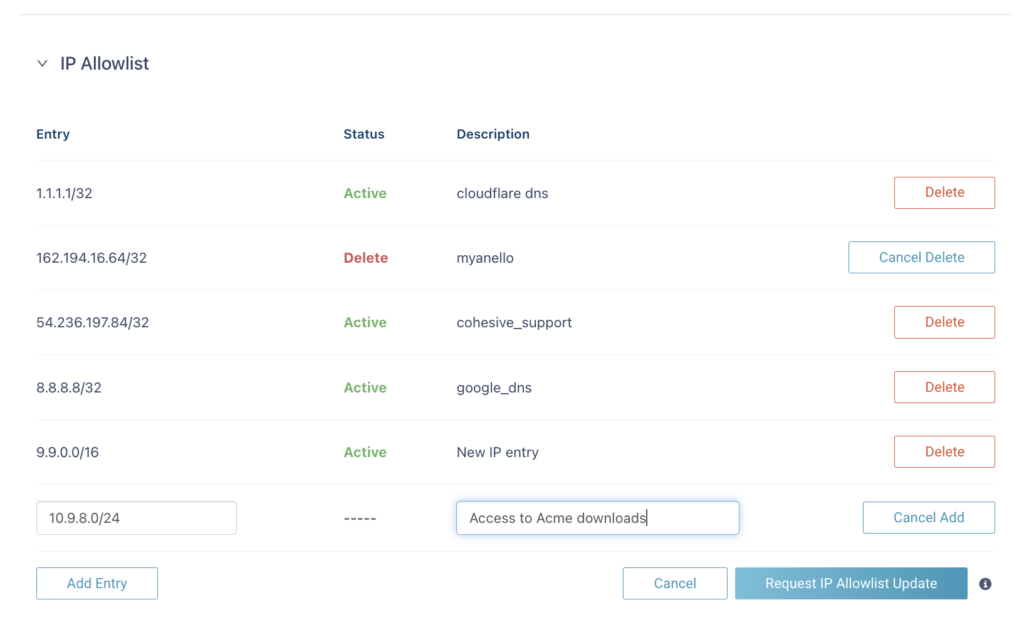
When you have completed making changes to the IP Allowlist table, you can click on “Request IP Allowlist Update” to submit. This will submit your updates for review by Rescale. For security purposes, all firewall updates are reviewed internally by Rescale before applying the requested updates.
You will now see your updates to the IP allowlist display as follows while your submitted updates are pending review:
- Entries you removed will have a status value of “Pending Delete”
- Entries you added will have a status value of “Pending Add”
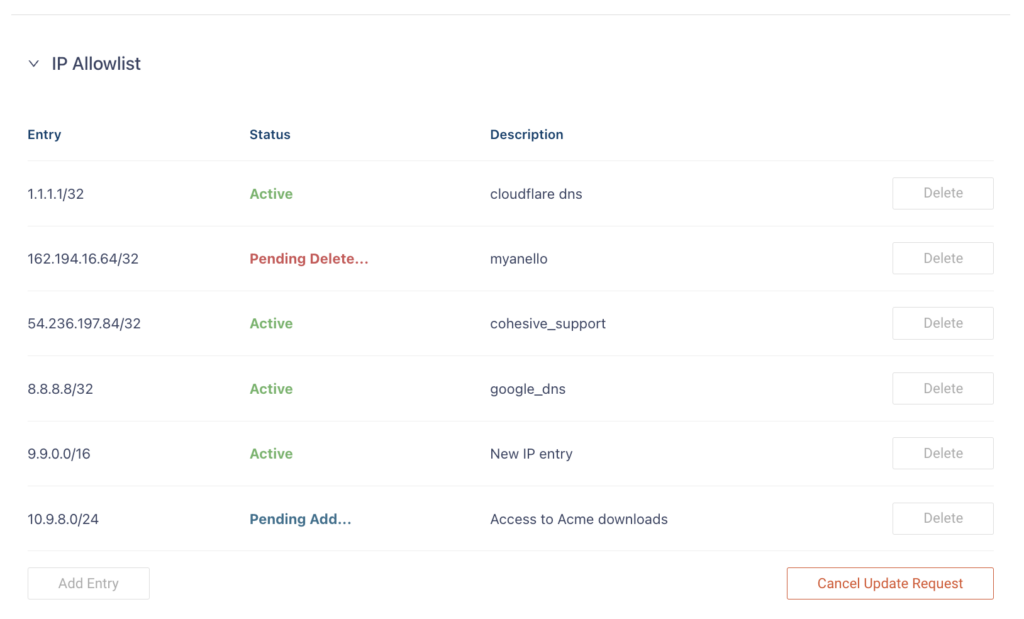
You can cancel an update request any time before the changes are applied. When there are pending changes to the IP Allowlist, you cannot make additional updates until the previously submitted changes are applied, or if you cancel your update request. Cancelling a pending update request will reset the allowlist entries back to their previous state.
Domain Allowlist Section
The next section on the CNAF administration page is the Domain Allowlist table. These values are synchronized across all deployed CNAFs within an organization, so it is not necessary to update each individual CNAF instance. Organization administrators can add or remove entries in the domain allowlist, and provide a short description for new entries.
To remove an existing value in the Domain Allowlist, click on the “Delete” button. To add a new value in the Domain Allowlist, click on the “Add Entry” button. Any changes made but not submitted can be canceled by selecting the “Cancel Delete” or “Cancel Add” buttons All domain values added to the allowlist need to follow acceptable domain name formats. You cannot specify URL strings that are prefixed with “https://” for example.
You can use basic regular expressions combined with domain name values to match multiple values with a single entry:
abcdefg-[0-9]*.blob.core.windows.net
Below is an example of updating a domain allowlist, using a regular expression combined with a second level domain that will match multiple sub domains:
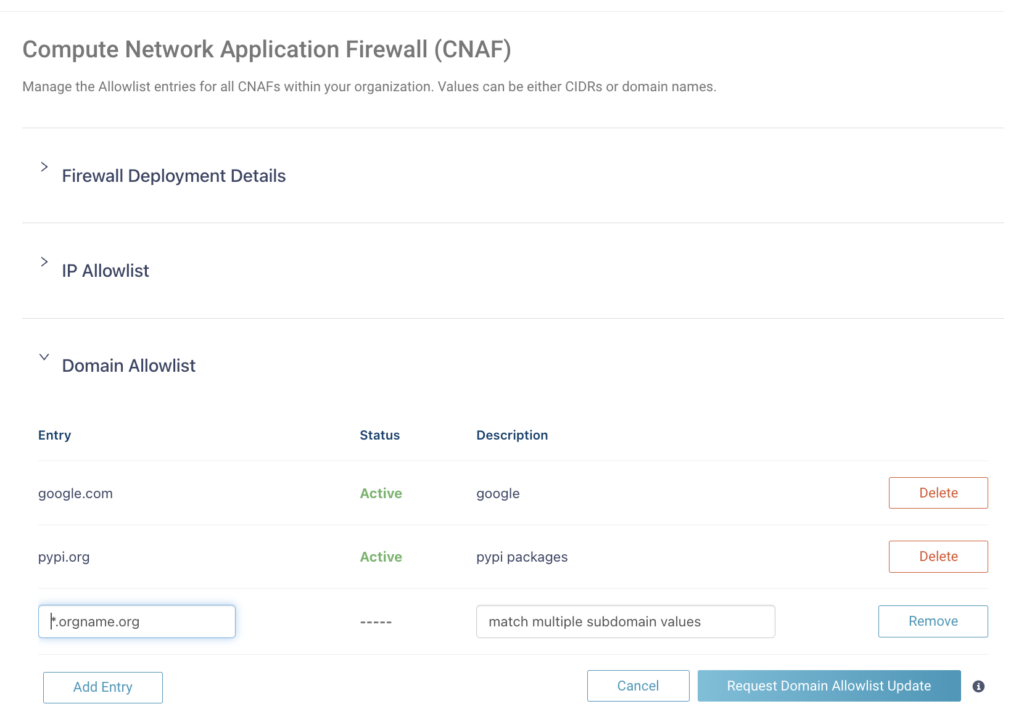
The entry *.orgname.org will match the following sample subdomains if they exist:
When you have completed making changes to the Domain Allowlist table, you can click on “Request Domain Allowlist Update” to submit. This will submit your updates for review by Rescale. For security purposes, all firewall updates are reviewed internally by Rescale before applying the requested updates.
You will now see your updates to the Domain Allowlist display as follows while your submitted updates are pending review:
- Entries you removed will have a status value of “Pending Delete”
- Entries you added will have a status value of “Pending Add”
You can cancel an update request any time before the changes are applied. When there are pending changes to the Domain Allowlist, you cannot make additional updates until the previously submitted changes are applied, or if you cancel your update request. Cancelling a pending update request will reset the allowlist entries back to their previous state.
The two allowlist tables for IP and Domain values can be updated separately.
Recent Updates section
You can view up to the ten (10) most recent updates to CNAFs within your organization. This includes submitted changes that are pending. Each past update entry includes the date of the change, who requested the change, and the current status. Below is an example of recent updates submitted that are in a Pending status awaiting approval by Rescale:

After requested updates have been applied, you will see the status change from “Pending” to “Applied” under the Recent Updates section:

Known Restrictions
- Creating new CNAFs is not automated at this time. Please submit new CNAF requests directly to Rescale.
- Domain list entries must be fully qualified domain names, not URL values.
- For domain list entries, only HTTPS traffic is allowed when using a CNAF. All other traffic will be dropped.
- Submitted requests to update CNAF allowlist entries are not automatically applied; they are first reviewed and approved by Rescale.
- Sometimes update requests are delayed to refresh the UI page automatically.
- CNAFs are not offered on Rescale high compliance platforms (FedRAMP and IL5).