
Coretype Sets
Overview
CoretypePre-configured and optimized architectures for different HPC... More sets help users work around cloud service provider capacity limitations by offering multiple combinations of coretypes and priorities to run for single jobs, allowing you to run jobs more smoothly when certain coretypes have low capacity. Coretype sets can also assist with building different launch policies to meet users’ needs.
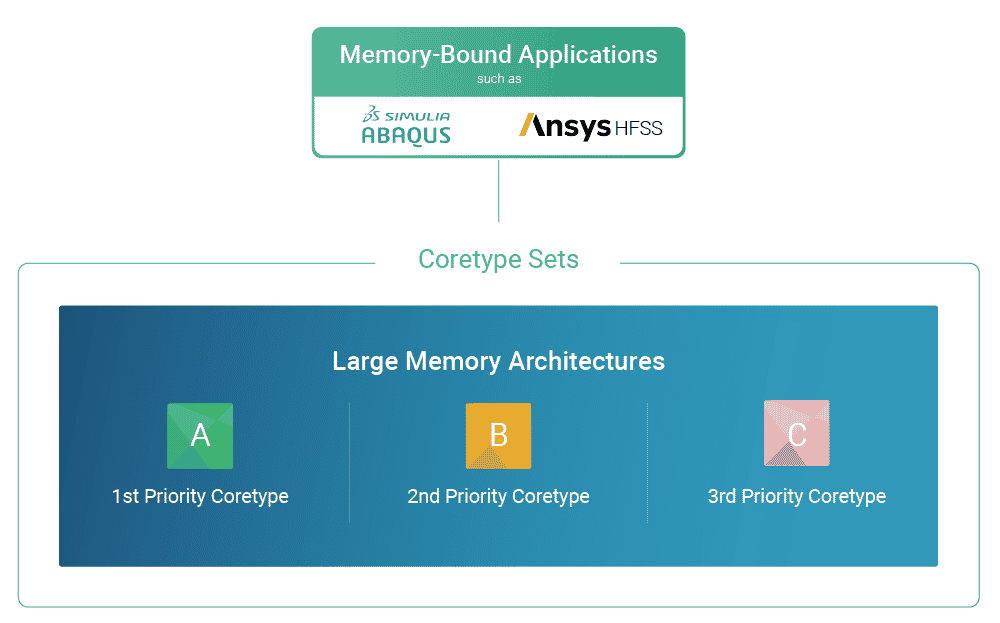
Coretype sets reduce potential wait time and improve job execution success rate by automatically switching to alternative coretypes if the primary coretype is not available.
Additionally, they can help users balance between cost and performance. For example, users can try to launch the job using On-Demand Economy and switch to On-Demand Priority if On-Demand Economy is not available.
A set can contain a mixture of On-Demand Economy (ODE) and On-Demand Priority (ODP) coretypes, as well as coretypes from different compute providers.
Note: On-Demand Reserved coretypes are not currently supported for coretype sets.
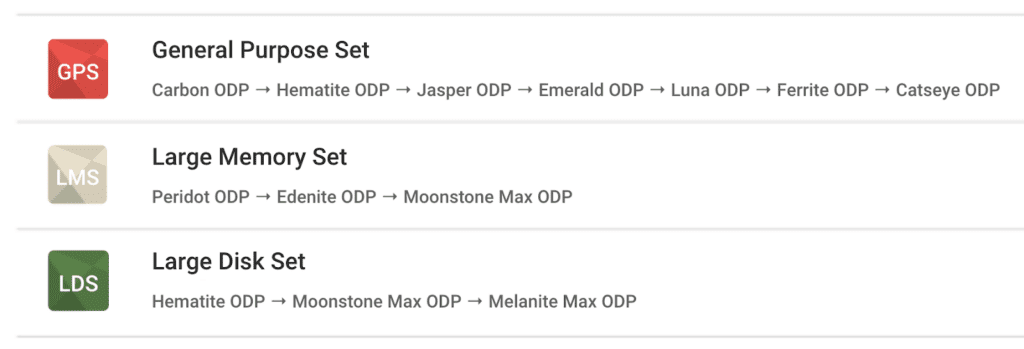
Using Coretype Sets
The order of coretypes in a set, as shown on the Hardware Settings screen, indicates the order of coretypes and priorities in which the job will try to launch with.
Coretype Sets consist of a pre-configured list of coretype + priority pairs. When launching a job with coretype sets, the Rescale platform will cycle through the coretype + priority pairs in the pre-determined order.
For example, it may start with Emerald with ODE priority then switch to Ferrite with ODP priority. If a coretype + priority is unable to be launched, Rescale will try to launch the job with the next coretype + priority until all options are exhausted. If a job with ODE priority is launched but terminated early due to CSP reclamation, Rescale will attempt to launch the job again using the next coretype.
Users will be billed based on the actual coretype and priority that was launched.
Core Count Transitions
When configuring the hardware settings for a job, the cores per slot value applies to the first coretype in the set. On a coretype transition, and if the subsequent coretypes do not have the same available cores per slot, the platform will attempt to match the cores per slot to the closest available corean individual processing unit within a multicore processor o... More count (either up or down) for the new coretype.
This means a job using a coretype set may not run with the exact core count indicated in job setup.
Note: If a coretype set job is running an analysis that supports multi-node, it is possible in certain cases to transition from a single to multi-node job.
Pricing
The cost of a coretype set job is dependent on the coretype and the number of cores that the job successfully launches with. The price range displayed next to a coretype set on the Hardware Selection screen is the set minimum and set maximum of all the coretypes and their priorities in the set.
When viewing the billing summary on the Company Admin page, the coretype that the job successfully ran with will be displayed.
Usage Guidelines
When using coretype sets, keep in mind the following guidelines:
- ODR is not available as part of coretype sets.
- Coretype sets do not support dynamic ordering. The order defined at the time of a coretype set’s creation will stay the same throughout its use.
How to Enable Coretype Sets
This feature is generally available to all Rescale users, but it requires specific platform enablement. If you’d like to set up a custom coretype set for your organization, please reach out to Rescale Support.
Learn More
- See the Billing Summaries topic to learn how to filter your organization’s billing by month.
- See the Coretype Explorer tool topic to better understand what cores can be used for given use cases.
- See the Coretype Portfolio to learn more about Rescale’s coretype offerings.
- See the Hardware Settings section of Running a Basic Job to learn how to further configure your hardware for your job.
- See to the Hardware on Demand topic to learn more about On-Demand Economy and On-Demand Priority coretype options.